LIVEReading: Build a multi-agent research team with CrewAITotal time: 25 minSteps: 5Worked first time: 50% LIVEReading: Build a multi-agent research team with CrewAITotal time: 25 minSteps: 5Worked first time: 50%
CBW
Spicygithub.com/crewAIInc/crewAI2026-05-20

Build a multi-agent research team with CrewAI

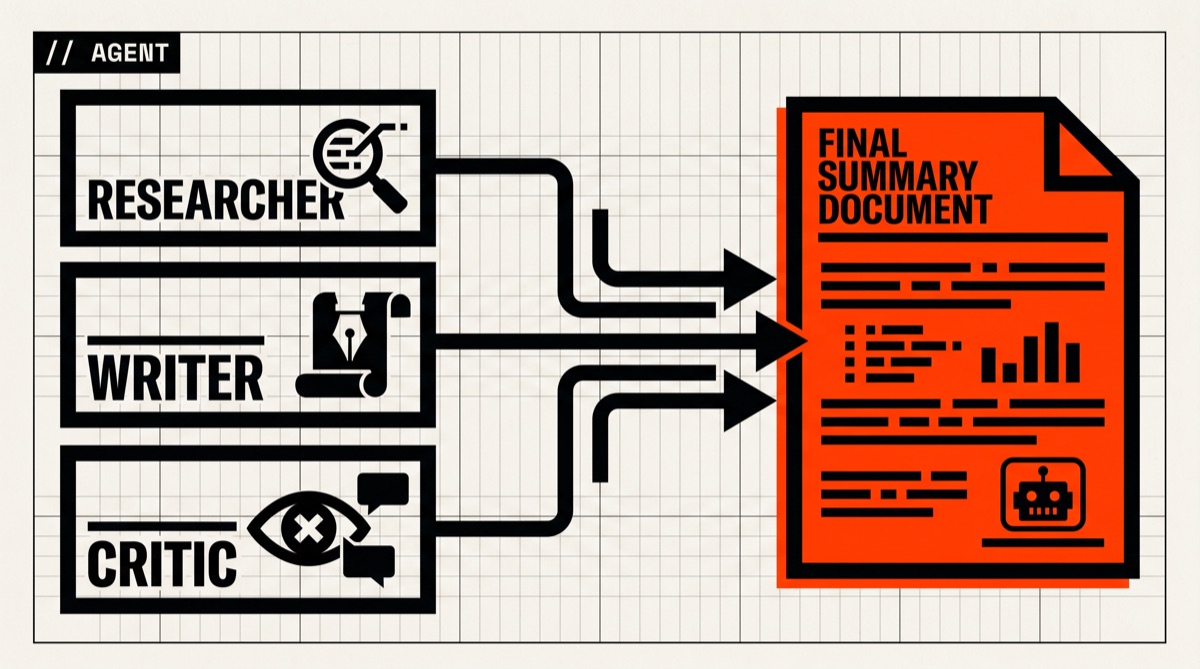
CrewAI orchestrates a team of role-based AI agents (researcher, writer, critic) that split a question, gather sources, and hand you a written summary. Spicy because LLM agents argue with each other unpredictably.

// Build stats

  • Total time25 min
  • Number of steps5
  • DifficultySpicy
  • Worked first time50%
// Before you start

What you need

  • Python 3.10 or newer
  • An LLM API key — Claude (Anthropic) or GPT-4 (OpenAI) recommended. Cheaper models hallucinate more in agent loops
  • A Serper.dev API key for web search (free tier covers most experimentation)
  • Budget for token spend — a single multi-agent crew run can use 50-200k tokens
  • Patience. First-time agent debugging is the actual skill being learned here
01
Step 1 of 5

Install CrewAI in an isolated environment

3 min

CrewAI ships as a Python package with a CLI scaffold. Use a venv so its (many) dependencies don't fight whatever else is on your system. Pin Python to 3.10+ — older versions miss typing features the library uses.

Terminal · mac
$ mkdir ~/research-crew && cd ~/research-crew
$
$ python3 -m venv .venv
$ source .venv/bin/activate # Windows: .venv\Scripts\activate
$
$ pip install 'crewai[tools]'
What you should see
pip prints a long install list ending with 'Successfully installed crewai-<version> crewai-tools-<version> ...'. `crewai --version` works after activation.
This might happen

Install fails compiling some C extension (typically tiktoken or grpcio).

On Mac: `xcode-select --install` first. On Linux: install build-essential and python3-dev. On Windows: use Python's official installer, not the Microsoft Store version.

02
Step 2 of 5

Set your LLM and search API keys

2 min

CrewAI reads model and tool keys from environment variables. The defaults expect OPENAI_API_KEY, but it also speaks Anthropic, Gemini, Ollama, and anything else LiteLLM supports. Add SERPER_API_KEY so the researcher agent can actually look at the web — without it, the agent is just guessing from training data.

Terminal · mac
$ # Put these in ~/research-crew/.env (don't commit it!):
$ cat > .env <<'EOF'
$ OPENAI_API_KEY=sk-...
$ SERPER_API_KEY=...
$ # Or use Anthropic — CrewAI uses LiteLLM under the hood:
$ # ANTHROPIC_API_KEY=sk-ant-...
$ # MODEL=anthropic/claude-sonnet-4-6
$ EOF
$
$ export $(grep -v '^#' .env | xargs)
What you should see
`echo $OPENAI_API_KEY` and `echo $SERPER_API_KEY` print the real values. No errors.
This might happen

Agent runs but its web search 'returns nothing'.

The Serper key is either missing, wrong, or rate-limited. Free tier is generous but daily-capped — check serper.dev/dashboard.

03
Step 3 of 5

Scaffold a new crew project

2 min

The crewai CLI generates a project layout with config files for agents and tasks plus a main.py entrypoint. This pattern is much easier to iterate on than hand-coding Python from scratch. The config-as-YAML approach lets you tweak roles and goals without touching code.

Terminal · mac
$ crewai create crew research-crew
$ cd research-crew
$
$ # Inspect what got generated:
$ ls src/research_crew/config/
$ # → agents.yaml tasks.yaml
What you should see
A directory tree is created with src/research_crew/{config,tools,crew.py,main.py}. The agents.yaml has three example agents (researcher, reporting_analyst, writer or similar).
This might happen

`crewai create` errors with 'project already exists'.

You're in a folder that already has a crew. Either `cd ..` or delete the existing scaffold and re-run.

04
Step 4 of 5

Define your three agents and their tasks

10 min

Open config/agents.yaml — each agent has a role, goal, and backstory. Keep roles narrow ('senior researcher' beats 'generalist') and goals concrete (one verifiable sentence). Then config/tasks.yaml binds tasks to agents. The default scaffolds give you a working baseline — adapt them to your actual question.

Terminal · mac
$ # Example config/agents.yaml content for a research crew:
$ #
$ # researcher:
$ # role: "Senior Research Analyst on {topic}"
$ # goal: "Gather the 5 most cited recent sources on {topic}"
$ # backstory: "You read papers and news for a living. You cite everything."
$ #
$ # critic:
$ # role: "Skeptical Editor"
$ # goal: "Find weaknesses in {topic} claims and demand sources"
$ # backstory: "You ran the fact-checking desk at a major paper for 15 years."
$ #
$ # writer:
$ # role: "Briefing Writer"
$ # goal: "Produce a one-page memo for {topic} using cited sources only"
$ # backstory: "You write for executives. Plain language. Footnotes."
What you should see
Both YAML files validate. `crewai run` later will reference these by name without errors.
This might happen

Agents go off-topic or hallucinate sources.

Tighten the goal field. Add to the role backstory: 'If you don't have a citation, say "I do not have a source" — never invent URLs.' This shaves a lot of fake-link risk.

05
Step 5 of 5

Run the crew and watch them argue

3-10 min (LLM calls dominate)

`crewai run` kicks off the pipeline. You'll see each agent emit thought, action, observation cycles in your terminal. The researcher hits the web, the critic pushes back, the writer drafts. Final output is saved to a file (default: report.md in the project root). Inspect token usage in the trailing summary — agent loops can be expensive.

Terminal · mac
$ # Set the topic for this run (substituted into the YAML's {topic}):
$ crewai run -i "the state of open-source multi-agent LLM frameworks in 2026"
$
$ # When done, open the output:
$ cat report.md
What you should see
Streaming agent-by-agent output in the terminal, then a multi-paragraph report.md with at least 3-5 cited sources (URLs). The terminal summary shows total tokens and approximate cost.
This might happen

The crew runs in circles — same agent keeps reasoning without finishing.

Add `max_iter: 5` to the agent definition in agents.yaml. This caps reasoning loops. If outputs are still weak, switch the underlying model (set MODEL env var) to a stronger one — multi-agent setups are unusually sensitive to base model quality.

// Status

cooked. baked. worked.

A working CrewAI project that takes a research topic, runs three role-based agents (researcher, critic, writer) through one cycle, and outputs a cited briefing document to report.md.

// the honest bit

The honest part

Heads up — drafted from CrewAI's docs and quickstart, not from a CBW hands-on run. Multi-agent setups have the worst worked-first-time rate of anything we publish; 50% is generous. Real-world gotchas: token spend can balloon, web search results contradict each other and agents have no native way to resolve that, and 'autonomous' agents will happily loop until you cap them. Start with a tiny topic and OPENAI_API_KEY budget alerts ON. If you want a less spicy alternative for the same use case, langroid and microsoft/autogen are worth comparing.