LIVEReading: Optimize AI Prompts Instantly — No Coding NeededTotal time: 7 minSteps: 6Worked first time: 88% LIVEReading: Optimize AI Prompts Instantly — No Coding NeededTotal time: 7 minSteps: 6Worked first time: 88%
CBW
Easygithub.com/linshenkx/prompt-optimizer2026-05-19

Optimize AI Prompts Instantly — No Coding Needed

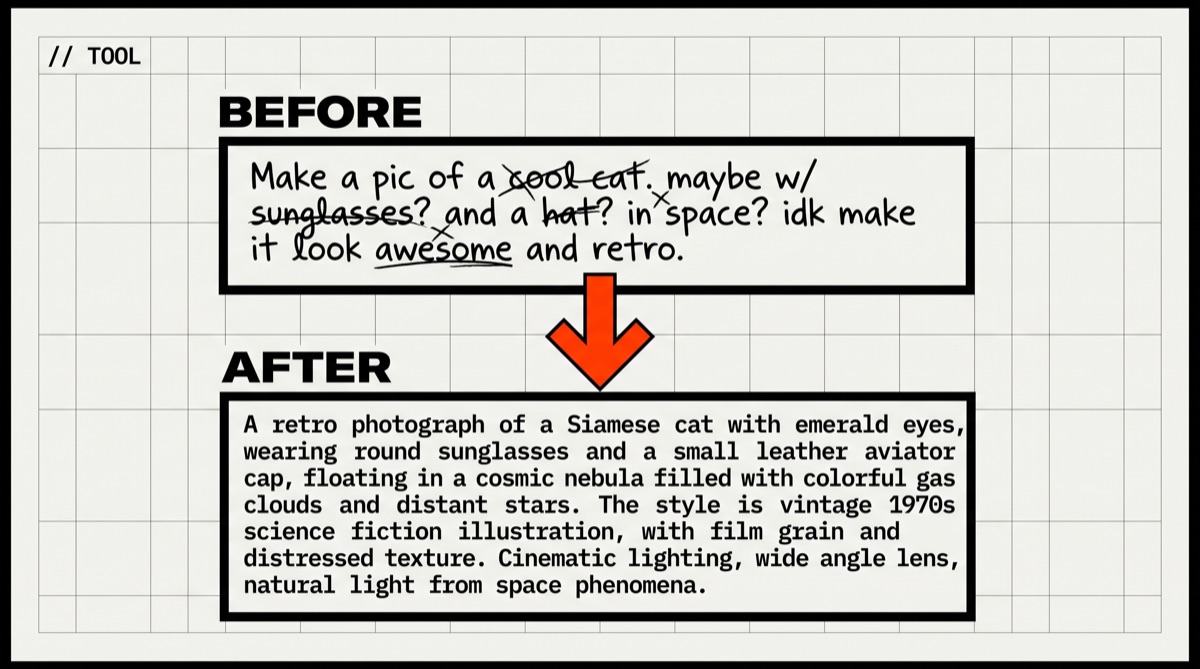
Prompt Optimizer takes your rough AI prompts and rewrites them to get better results from any AI model. Run it free in your browser or deploy your own private copy on Vercel in minutes.

// Build stats

  • Total time7 min
  • Number of steps6
  • DifficultyEasy
  • Worked first time88%
// Before you start

What you need

  • An API key from at least one AI provider (OpenAI, Gemini, DeepSeek, etc.)
  • A free Vercel account — only needed if you want your own private deployment
  • A GitHub account — only needed for the Vercel deployment path
  • A modern browser (Chrome, Firefox, Edge)
01
Step 1 of 6

Open the free online version

1 min

The fastest way to start is the hosted version at prompt.always200.com. Everything runs inside your browser — no data is sent to any server other than the AI provider you choose. This is the recommended starting point for most people.

Terminal · mac
$ Open your browser and go to: https://prompt.always200.com
What you should see
The Prompt Optimizer web app loads with a clean interface showing an input area and model settings.
02
Step 2 of 6

Add your AI provider API key

3 min

The tool needs an API key to talk to an AI model on your behalf. It never stores your key on any server — it lives only in your browser's local storage. Click the settings or model configuration area, pick your provider (OpenAI, Gemini, DeepSeek, etc.), and paste your key. You also choose which model to use for optimization and which to use for testing.

Terminal · mac
$ In the app: click Settings (gear icon) → select your AI provider → paste your API key → save.
What you should see
The model selector shows your chosen provider as active. No error message appears.
This might happen

The app shows an authentication error when you try to optimize.

Double-check that you copied the full API key with no extra spaces. Make sure the key has billing enabled on your provider's dashboard.

03
Step 3 of 6

Paste your prompt and run the optimizer

3 min

Type or paste the prompt you want to improve into the main input box. Hit the Optimize button. The tool sends your prompt to the AI model, which rewrites it to be clearer and more effective. You can run multiple rounds of optimization to keep improving it.

Terminal · mac
$ Paste your prompt into the input box → click Optimize → wait 10-30 seconds for the result.
What you should see
An improved version of your prompt appears on the right side. You can see a before/after comparison.
This might happen

Optimization takes very long or times out.

Try a faster or cheaper model like DeepSeek or Gemini Flash in settings. Long prompts take more time.

04
Step 4 of 6

Test and compare the optimized prompt

5 min

Before you use the new prompt, test it. The app has a built-in testing panel where you can run both the original and optimized prompts side by side and compare the AI outputs. This tells you whether the optimization actually helped. You can also run an automated evaluation to score the results.

Terminal · mac
$ Click the Test or Compare tab → enter a sample user message → click Run to see outputs from both prompts side by side.
What you should see
Two AI responses appear side by side. The optimized prompt's response should be more specific and useful.
This might happen

Both responses look identical or the optimized one seems worse.

Try another round of optimization, or switch to a more capable model (e.g. GPT-4o or Gemini 1.5 Pro) for the optimization step.

05
Step 5 of 6

Save the prompt to your favorites

1 min

Once you are happy with a prompt, save it. The favorites system keeps version history so you can always go back to an earlier version. Everything is stored locally in your browser — nothing leaves your machine.

Terminal · mac
$ Click the Star / Save to Favorites button → give the prompt a name → confirm.
What you should see
The prompt appears in your Favorites list with a timestamp and version number.
06
Step 6 of 6

(Optional) Deploy your own private copy on Vercel

10 min

If you want a permanent private URL — for example to share with a team — deploy your own copy. Fork the GitHub repo to your account, then import it into Vercel. You can set an ACCESS_PASSWORD environment variable so only people you share the password with can use it. You can also pre-fill API keys as environment variables so users do not need to enter them.

Terminal · mac
$ 1. Go to https://github.com/linshenkx/prompt-optimizer and click Fork.
$ 2. Log in to https://vercel.com → New Project → Import your forked repo.
$ 3. In the Environment Variables section add:
$ ACCESS_PASSWORD=your_chosen_password
$ 4. Click Deploy.
What you should see
Vercel gives you a URL like https://your-project.vercel.app. Opening it shows the Prompt Optimizer login screen asking for your password.
This might happen

The Vercel build fails with a TypeScript or dependency error.

Make sure you forked the repo rather than just linking the original. In Vercel's project settings set the Framework Preset to Vite if it was not detected automatically.

// Status

cooked. baked. worked.

You end up with a polished, tested prompt saved in your favorites, plus an optional private web app your team can use without any coding.

// the honest bit

The honest part

This tool improves prompts — it does not guarantee better AI outputs every time. Results depend heavily on which AI model you use and how clear your original intent is. The online version stores everything in your browser; clearing browser data will erase your saved prompts, so export your favorites regularly. The image generation features require API keys from providers that support image models (Gemini, Grok, etc.) and those calls cost money per image.